
In that previous article, you can find a how-to for running Syncthing on a Raspberry Pi based three node k3s cluster running Ceph via Rook.
What the previous article left open is the question of backups.
Syncthing replicates files between devices, but replication is not a backup.
An accidental delete or a corrupted file is happily synchronized to every peer—although Syncthing also supports some kind of versioning files and keeping a backup.
On my old Raspberry Pi 3 setup, I used Duplicity (see also: this article).
For the new k3s setup, I have replaced Duplicity with restic running as a Kubernetes CronJob.
This article summarizes the setup.
By the end, you’ll have a weekly, encrypted, deduplicated backup of a Syncthing PVC into any S3-compatible bucket.
Why Restic?
Duplicity served me well for many years, but it has two properties that became inconvenient on the new cluster. First, the backup format is a chain of full and incremental archives, which means a restore requires the full backup plus every incremental on top of it. Second, Duplicity does not deduplicate across files—it only diffs against the previous archive. Since my Syncthing directories exceed the size of 1TB, those properties, combined with the limited upload bandwidth of my Internet provider, are simply not ideal.
restic takes a different approach.
It is a single Go binary, which makes it easy to package for arm64.
It deduplicates at the chunk level across the entire repository, so moving a large file inside a Syncthing folder does not cost a second copy in the backup.
Every backup is a snapshot that can be restored independently.
It encrypts the repository client-side and supports many backends out of the box, including any S3-compatible object store.
For my setup, the combination of chunk-level deduplication, encryption, and AWS Simple Storage Service (S3) backend was the deciding factor. This setup reduced the backup time from hours to ca. 10-30 minutes depending on the amount of file changes in Syncthing—not too many in my case.
Architecture Overview
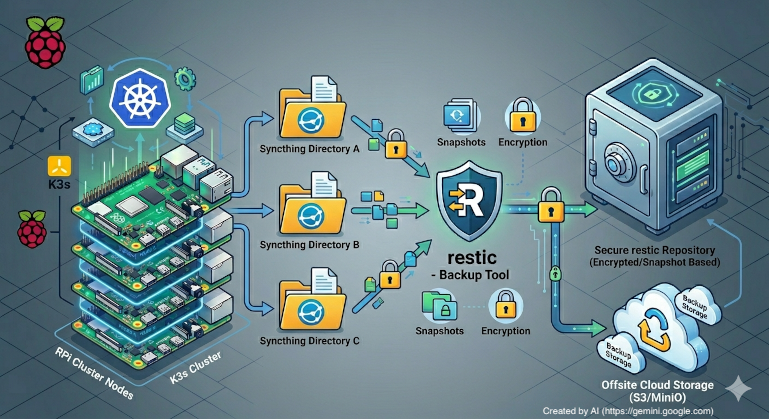
The Syncthing backup setup adds a single Kubernetes CronJob to the existing Syncthing namespace.
The CronJob runs once a week, mounts the Syncthing data volume as read-only, and pushes a restic snapshot to an AWS S3 bucket.
The relevant pieces are:
- A small backup script (see also: this section).
- A
ConfigMapthat ships the backup script into the pod (see also: this section). - A
Secret(restic-secrets) that holds the repository URL, the repository password, and the AWS S3 credentials used in the backup script and the pod (see also: this section). - A
CronJobthat schedules the backup container and runs the backup script (see also: this section). - The existing Syncthing Persistent Volume Claim (PVC) (see also: this article) mounted as read-only into the backup pod started by the cronjob (see also: this section).
One change to the previous Syncthing setup is worth highlighting up front: the PVC is now backed by rook-cephfs with access mode ReadWriteMany instead of rook-ceph-block with ReadWriteOnce.
Block storage with ReadWriteOnce only allows a single pod to mount the Persistent Volume (PV) at any time, which would force the backup job to either share the Syncthing pod or wait for it to terminate.
With CephFS and ReadWriteMany, the backup pod can mount the same PV in parallel with the running Syncthing pod—read-only, of course, so it cannot interfere with what Syncthing is writing.
In the next sections, we walk through the backup-related templates in detail.
The Backup Script
The basic container image used for the backup is the official restic Docker image (restic/restic).
It is a small image that bundles restic and the sh/coreutils needed by a custom backup script depending on restic and a POSIX shell:
#!/bin/sh
set -e

# Initialize restic repo if it doesn't exist yet
restic snapshots > /dev/null 2>&1 || restic init

# Run restic backup
echo "Starting restic backup..."
restic backup /var/syncthing

# Prune old backups
echo "Pruning old backups..."
restic forget \
  --keep-weekly "$RETENTION_WEEKS" \
  --prune

echo "Backup completed successfully."
Three things happen on every run:
- Initialize on first run:
restic snapshotsreturns non-zero if the repository does not exist yet. In that case we runrestic init. On every subsequent run, the snapshot listing succeeds andinitis skipped. - The backup (snapshots):
restic backup /var/syncthingwalks the Syncthing data directory—mounted as read-only at the same path Syncthing uses inside its container—and uploads only the chunks it has not seen before. - The cleanup:
restic forget --keep-weekly $RETENTION_WEEKS --prunekeeps the lastRETENTION_WEEKSweekly snapshots and removes everything else, then garbage-collects the unreferenced chunks from the repository in the same step. TheRETENTION_WEEKSvalue is set via an environment variable in theCronJobdeployment descriptor (see also: here).
The --prune flag is what actually frees space in the AWS S3 bucket.
Without it, forget only removes snapshot pointers and leaves the chunks behind.
Combining forget and prune in the same command means the bucket size stays bounded by the retention window.
The script is mounted into the pod via a ConfigMap:
apiVersion: v1
kind: ConfigMap
metadata:
  name: syncthing-backup-script
  namespace: syncthing
  labels:
    app: syncthing-backup
data:
  backup.sh: |
    [...]
In my setup, I use Helm to read the script (see: here) from a file and embed it into the ConfigMap—you can also embed the backup script directly into the deployment descriptor.
However, keeping the script as a separate file means it can be edited and tested locally with normal shell tools.
The CronJob
The CronJob itself is the core of the setup:
apiVersion: batch/v1
kind: CronJob
metadata:
  name: syncthing-backup
  namespace: syncthing
  labels:
    app: syncthing-backup
spec:
  schedule: "30 2 * * 0"
  concurrencyPolicy: Forbid
  successfulJobsHistoryLimit: 3
  failedJobsHistoryLimit: 3
  jobTemplate:
    spec:
      backoffLimit: 2
      template:
        spec:
          hostname: syncthing-backup
          securityContext:
            runAsNonRoot: true
            runAsUser: 1000
            runAsGroup: 1000
            seccompProfile:
              type: RuntimeDefault
          affinity:
            podAffinity:
              requiredDuringSchedulingIgnoredDuringExecution:
                - labelSelector:
                    matchExpressions:
                      - key: app
                        operator: In
                        values:
                          - syncthing
                  topologyKey: kubernetes.io/hostname
          containers:
            - name: backup
              image: restic/restic:latest
              imagePullPolicy: IfNotPresent
              securityContext:
                allowPrivilegeEscalation: false
                capabilities:
                  drop:
                    - ALL
              resources:
                requests:
                  cpu: 200m
                  memory: 256Mi
                limits:
                  cpu: 500m
                  memory: 1Gi
              env:
                - name: RESTIC_REPOSITORY
                  valueFrom:
                    secretKeyRef:
                      name: restic-secrets
                      key: RESTIC_REPOSITORY
                - name: RESTIC_PASSWORD
                  valueFrom:
                    secretKeyRef:
                      name: restic-secrets
                      key: RESTIC_PASSWORD
                - name: AWS_ACCESS_KEY_ID
                  valueFrom:
                    secretKeyRef:
                      name: restic-secrets
                      key: AWS_ACCESS_KEY_ID
                - name: AWS_SECRET_ACCESS_KEY
                  valueFrom:
                    secretKeyRef:
                      name: restic-secrets
                      key: AWS_SECRET_ACCESS_KEY
                - name: TZ
                  value: Europe/Berlin
                - name: RETENTION_WEEKS
                  value: "12"
              command: ["/bin/sh", "/scripts/backup.sh"]
              volumeMounts:
                - name: syncthing-data
                  mountPath: /var/syncthing
                  readOnly: true
                - name: backup-script
                  mountPath: /scripts
                  readOnly: true
                - name: cache
                  mountPath: /.cache
          restartPolicy: OnFailure
          volumes:
            - name: syncthing-data
              persistentVolumeClaim:
                claimName: syncthing-pv-claim
            - name: backup-script
              configMap:
                name: syncthing-backup-script
                defaultMode: 0755
            - name: cache
              emptyDir: {}
A few details deserve a closer look in the next sections.
Schedule and Concurrency
The schedule is set to 30 2 * * 0 and runs every Sunday at 02:30 in Europe/Berlin (set via the TZ environment variable).
For me, weekly snapshots are a good balance between restore granularity, bucket costs, and my Internet upload speed.
Daily snapshots would tighten the recovery window but multiply AWS S3 costs and saturate my upstream link.
concurrencyPolicy: Forbid ensures that another run does not overlap the current one—i.e., it prevents running multiple jobs in parallel and, thus, filesystem read-write conflicts.
Combined with backoffLimit: 2, a transient failure is retried twice before the job is marked failed, and successfulJobsHistoryLimit / failedJobsHistoryLimit keep three of each around for inspection via kubectl get jobs -n syncthing.
Pod Affinity
The podAffinity rule schedules the backup pod onto the same k3s node as the Syncthing pod.
With CephFS this is not strictly required for correctness, but it keeps the read traffic of a backup local to one node instead of pulling all data through the network from a different node.
For a Raspberry Pi cluster on a 1 GbE switch, that matters.
Security Context
The pod runs as a non-root UID/GID (1000), drops all capabilities, disables privilege escalation, and uses the RuntimeDefault seccomp profile (see also: Restrict a Container’s Syscalls with seccomp).
The Syncthing container itself runs with the same UID, so the read-only mount at /var/syncthing is readable by the backup user without any fsGroup gymnastics.
Volumes
Three volumes are mounted:
syncthing-datais the Syncthing PVC with access modeReadWriteMany, mounted read-only at/var/syncthing. Read-only is essential—the backup must never be able to corrupt the data it is supposed to protect.backup-scriptis theConfigMapfrom the previous section (see also: this section), mounted at/scriptswith mode0755so the shell can execute it.cacheis anemptyDirmounted at/.cache. restic uses this directory to cache pack file metadata between runs—this setup uses a node-local scratch directory recreated on every pod start.
The Secret
The Secret with restic and AWS S3 credentials is created via kubectl:
kubectl create secret generic restic-secrets \
  --namespace syncthing \
  --from-literal=RESTIC_REPOSITORY='s3:https://s3.example.com/my-bucket/syncthing' \
  --from-literal=RESTIC_PASSWORD='<a long random passphrase>' \
  --from-literal=AWS_ACCESS_KEY_ID='<access key>' \
  --from-literal=AWS_SECRET_ACCESS_KEY='<secret key>'
Two notes on the values:
RESTIC_REPOSITORYfollows the restic S3 URL format:s3:<endpoint>/<bucket>[/<path>]. Any S3-compatible provider works—AWS S3, Backblaze B2 via its S3 endpoint, MinIO, Hetzner Object Storage, etc.- Store the
RESTIC_PASSWORDsomewhere outside the cluster. It is the only thing standing between the encrypted bucket and a usable restore. If you lose it, the backup is unreadable. Please do not use an LLM to generate the password—LLMs do not produce cryptographically secure randomness by design (see also: Vibe Password Generation: Predictable by Design).
Restoring
A restore from this setup is a one-off pod that mounts the same Secret and runs restic restore.
The shortest path is:
kubectl run restic-restore -n syncthing -it --rm --restart=Never \
  --image=restic/restic:latest \
  --overrides='{
    "spec": {
      "containers": [{
        "name": "restic-restore",
        "image": "restic/restic:latest",
        "envFrom": [{ "secretRef": { "name": "restic-secrets" } }],
        "command": ["sh"],
        "stdin": true, "tty": true
      }]
    }
  }'
Inside the shell that opens, run:
restic snapshots                       # list available snapshots
restic restore latest --target /tmp    # restore the most recent snapshot
For a full disaster recovery into a fresh cluster, mount the new Syncthing PVC into the restore pod and restic restore latest --target /var/syncthing straight into it before starting Syncthing.
Summary
In this article, I described a small backup solution for a Syncthing deployment on k3s.
A weekly Kubernetes CronJob runs restic, snapshots the Syncthing data volume, and pushes encrypted, deduplicated chunks to an AWS S3 bucket.
A bounded retention window (12 weeks in my case) combined with forget --prune keeps the AWS S3 bucket size in check.
Switching the underlying PVC from rook-ceph-block to rook-cephfs (ReadWriteMany) is what makes it possible to back up while Syncthing keeps running.
As always, this is a snapshot of a setup that works for me on my Raspberry Pi based k3s cluster with Ceph. Your setup—especially the retention time and schedule—should follow your own data and risk tolerance. If you want to report issues or have questions, please use the issues and discussions functionality at the underlying GitHub repository.